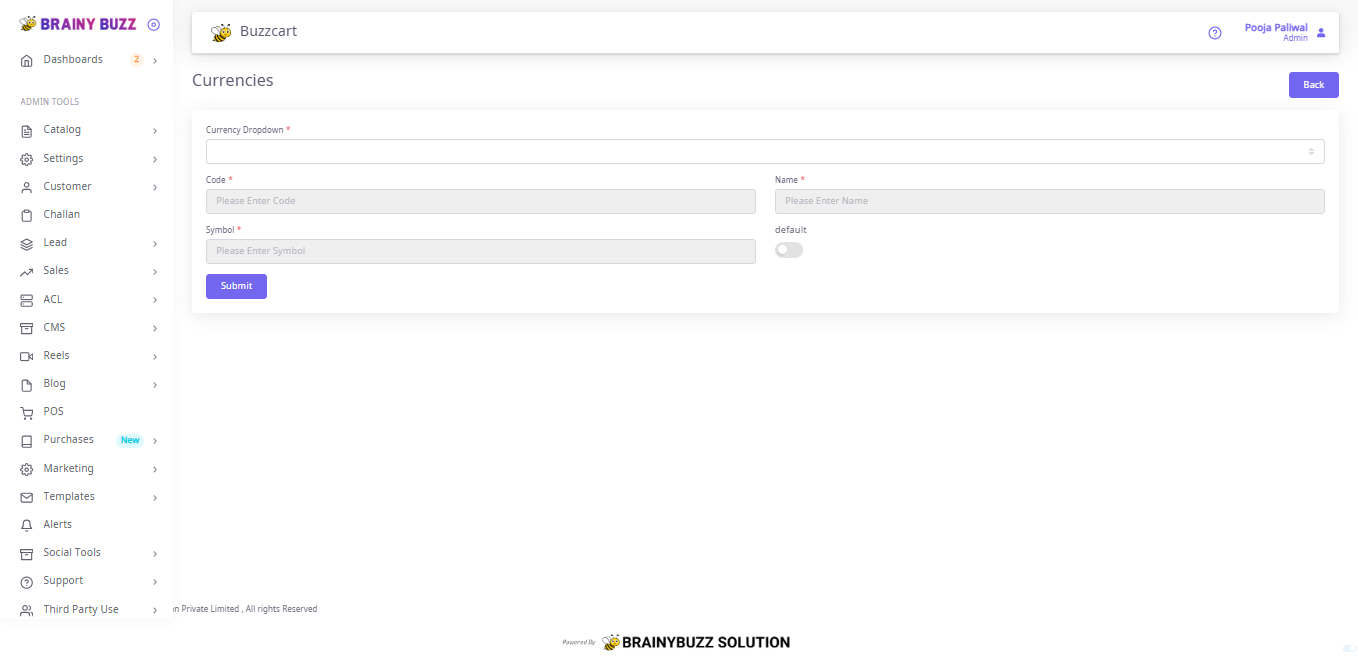
Currencies Creation — Steps
Purpose
Create a currency entry to use in pricing and storefront display.
Prerequisites
- Logged in as Admin or Catalog Manager.
- Know the ISO code, name, and symbol for the currency.
Navigation
- Go to Catalog → Currencies (open the Currencies page).
Steps
- Open Catalog → Currencies.
- (Optional) Use Currency Dropdown to select and edit an existing currency.
- In Code enter the currency code (use standard ISO-style short code).
- In Name enter the currency name.
- In Symbol enter the display symbol used on prices.
- Toggle Default ON if you want this currency to be the store default.
- Click Submit to save the currency.
- Confirm the currency appears in the currencies list and behaves as expected in product/pricing views.
Notes
- Code / Name / Symbol are required fields.
- Only one currency should be set as Default at a time — enabling Default may unset the previous default.